Headless WordPress Guide: Everything Beginners Need to Know
WordPress powers more than 40% of websites on the internet. For years, it has been the go-to platform for bloggers, businesses, and developers because it combines content management and website presentation in one package.
But in recent years, you’ve probably heard terms like:
- Headless WordPress
- Headless CMS
- React + WordPress
- Next.js + WordPress
- JAMstack
If these sound confusing, don’t worry.
This guide explains Headless WordPress in simple language, even if you’ve never written a line of code.
By the end of this article, you’ll understand:
- What Headless WordPress is
- How it works
- Why companies use it
- Its advantages and disadvantages
- Whether beginners should use it
- SEO considerations
- Popular tools
- Common mistakes
- Future trends
Let’s begin.
What Is Headless WordPress?
Traditional WordPress combines two things:
- Backend
- Dashboard
- Posts
- Pages
- Media Library
- Users
- Plugins
- Frontend
- Theme
- Templates
- Design
- Navigation
- Styling
Everything works together.
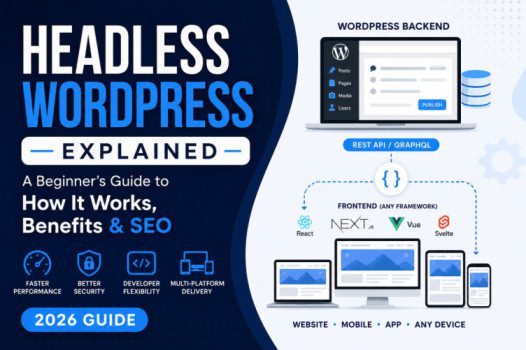
In Headless WordPress, these two parts are separated.
WordPress manages only your content.
A completely different technology displays your website.
Imagine this:
Traditional WordPress
WordPress
├── Dashboard
├── Database
├── Theme
├── Website
Headless WordPress
WordPress
├── Dashboard
├── Database
└── API
       ↓
React / Next.js / Vue
       ↓
Website
Instead of using a WordPress theme, the frontend fetches content from WordPress using an API.
Why Is It Called “Headless”?
Think of WordPress as a body.
The “head” is what visitors see—the website.
When you remove that head and replace it with another frontend framework, WordPress becomes “headless.”
The content still exists.
Only the presentation changes.
Traditional WordPress vs Headless WordPress
| Feature | Traditional | Headless |
|---|---|---|
| WordPress Theme | Yes | No |
| Page Builder | Yes | Usually No |
| Gutenberg | Yes | Content Only |
| Frontend | WordPress | React, Vue, Next.js |
| Plugins | Most Work | Some Work |
| REST API | Optional | Essential |
| Learning Curve | Easy | Advanced |
| Development Speed | Faster | Slower Initially |
| Performance | Good | Excellent (when optimized) |
How Headless WordPress Works
The process is surprisingly simple.
Step 1
You write a blog post inside WordPress.
Step 2
WordPress stores everything in its database.
Step 3
The REST API (or GraphQL) exposes that content.
Example:
https://example.com/wp-json/wp/v2/postsStep 4
A React or Next.js application requests that data.
Step 5
The frontend displays the content beautifully.
Your visitors never know WordPress is running behind the scenes.
Understanding the WordPress REST API
The REST API acts like a messenger.
Instead of visitors loading a WordPress page, the frontend asks:
“Can you send me the latest blog posts?”
WordPress replies with structured JSON data.
Example:
{
"title":"Welcome",
"author":"John",
"date":"2026-07-05"
}
The frontend converts that into an attractive webpage.
Why Are Companies Moving to Headless WordPress?
Many modern websites need to publish content across multiple platforms.
For example:
- Website
- Mobile app
- Smart TV
- Digital kiosk
- Smartwatch
- Voice assistant
Instead of managing content separately, WordPress stores it once.
Every platform retrieves the same content through APIs.
Advantages of Headless WordPress
1. Incredible Performance
Modern frameworks load pages much faster.
Benefits include:
- Faster page loads
- Better Core Web Vitals
- Improved user experience
- Higher conversion rates
2. Better Security
Since visitors don’t directly interact with WordPress themes, many common attack vectors are reduced.
Although WordPress still requires updates and maintenance, the public-facing frontend exposes fewer traditional WordPress components.
3. Flexible Design
You’re not limited by WordPress themes.
Developers can create:
- Custom animations
- Interactive dashboards
- Advanced interfaces
- Mobile-like experiences
4. Multi-Platform Publishing
One WordPress dashboard can power:
- Websites
- Apps
- Digital displays
- IoT devices
- Internal portals
5. Developer Freedom
Developers can use:
- React
- Vue
- Angular
- Svelte
- Next.js
- Nuxt
instead of PHP themes.
Disadvantages of Headless WordPress
Higher Complexity
Traditional WordPress:
Install theme → Publish.
Headless:
Configure API → Build frontend → Deploy → Cache → Host separately.
There are more moving parts to manage.
More Expensive
Development costs usually increase because you’re maintaining both WordPress and a separate frontend application.
Plugin Compatibility
Many WordPress plugins expect to render content through WordPress themes.
Features like:
- Shortcodes
- Widgets
- Contact forms
- Popups
- Theme-specific layouts
may require custom frontend implementations.
Harder for Beginners
Learning involves:
- APIs
- JSON
- React
- Next.js
- JavaScript
- Deployment
- Git
This makes Headless WordPress less approachable for non-technical users.
Is Headless WordPress Better for SEO?
Not automatically.
A well-built headless site can achieve excellent SEO, but only if the frontend handles SEO correctly.
You should ensure:
- Server-side rendering (SSR) or static site generation (SSG)
- Fast loading pages
- Proper title tags
- Meta descriptions
- Structured data
- XML sitemaps
- Canonical URLs
- Open Graph tags
- Robots.txt
- Correct redirects
Simply switching to headless will not improve rankings by itself.
Best Frontend Frameworks
Next.js
The most popular option because it supports:
- SSR
- SSG
- Incremental Static Regeneration (ISR)
- Excellent SEO
- Image optimization
Ideal for blogs, business sites, and content-heavy websites.
React
Great for interactive web applications.
Commonly used when developers need full control over the user interface.
Vue.js
Known for its gentle learning curve and simplicity.
Suitable for teams that prefer Vue’s syntax and ecosystem.
Nuxt
A framework built on Vue that offers server-side rendering and static generation, making it suitable for SEO-focused projects.
SvelteKit
Lightweight and fast, with growing popularity for performance-oriented projects.
Headless WordPress Hosting
Typically, you’ll host two parts:
WordPress Backend
- Shared Hosting
- VPS
- Managed WordPress Hosting
Frontend
- Vercel
- Netlify
- Cloudflare Pages
- AWS
- Azure
The frontend communicates with WordPress through secure APIs.
Popular Headless WordPress Stack
A common setup looks like this:
WordPress
↓

REST API

↓

Next.js

↓

Vercel

↓

CDN

↓

Visitors
This architecture delivers content quickly while keeping WordPress focused on content management.
Common Use Cases
Headless WordPress is often used for:
- Enterprise websites
- News portals
- SaaS marketing sites
- Mobile applications
- E-learning platforms
- Multi-language websites
- E-commerce storefronts (with custom frontends)
- Digital signage
- Corporate portals
Is WooCommerce Compatible?
Yes, but with extra work.
WooCommerce can power a headless storefront, but many features such as carts, checkout flows, customer accounts, and payment integrations often need custom development or specialized APIs.
For many small online stores, traditional WordPress with WooCommerce remains the simpler option.
Common Beginner Mistakes
Avoid these pitfalls:
- Choosing headless just because it’s trendy
- Ignoring SEO requirements
- Underestimating development costs
- Forgetting image optimization
- Not planning API security
- Assuming every plugin will work
- Skipping caching and CDN configuration
- Neglecting deployment workflows
Should Beginners Use Headless WordPress?
It depends on your goals.
Choose Traditional WordPress if you:
- Run a personal blog
- Build small business websites
- Use page builders
- Want quick setup
- Prefer minimal maintenance
Consider Headless WordPress if you:
- Have development experience
- Need a highly customized frontend
- Publish content across multiple platforms
- Require exceptional performance
- Have the budget for ongoing development
For most beginners, traditional WordPress offers a faster path to launching and managing a successful website.
Frequently Asked Questions
Is Headless WordPress free?
Yes. WordPress is open source, but you’ll still pay for hosting, domains, and any premium tools or frontend hosting you choose.
Do I still need WordPress themes?
No. In a headless setup, the frontend is built with frameworks like Next.js or React instead of a WordPress theme.
Can I use Elementor or page builders?
Generally, page builders are designed for traditional WordPress themes. Their visual layouts usually won’t render automatically in a headless frontend.
Is Headless WordPress faster?
It can be, especially when paired with static generation, server-side rendering, caching, and a CDN. Performance depends on how the site is built and deployed.
Can I migrate later?
Yes. Many businesses start with traditional WordPress and transition to a headless architecture as their technical needs grow.
Future of Headless WordPress
Headless architecture continues to gain traction as websites expand beyond the browser to apps, kiosks, and connected devices.
With advances in AI-assisted development, improved APIs, edge computing, and modern JavaScript frameworks, building and maintaining headless sites is becoming more accessible.
However, traditional WordPress remains the best choice for many blogs, small businesses, and content creators because of its simplicity and extensive ecosystem.
Final Thoughts
Headless WordPress separates content management from website presentation, giving developers greater flexibility and the potential for outstanding performance. It shines for organizations that need custom experiences, multi-platform publishing, or advanced web applications.
For most WordPress beginners and small website owners, though, traditional WordPress is still the most practical solution. It’s easier to learn, quicker to launch, and fully supported by the vast WordPress ecosystem.
The best approach is to choose the architecture that matches your goals, technical skills, and budget—not simply the latest trend.