
























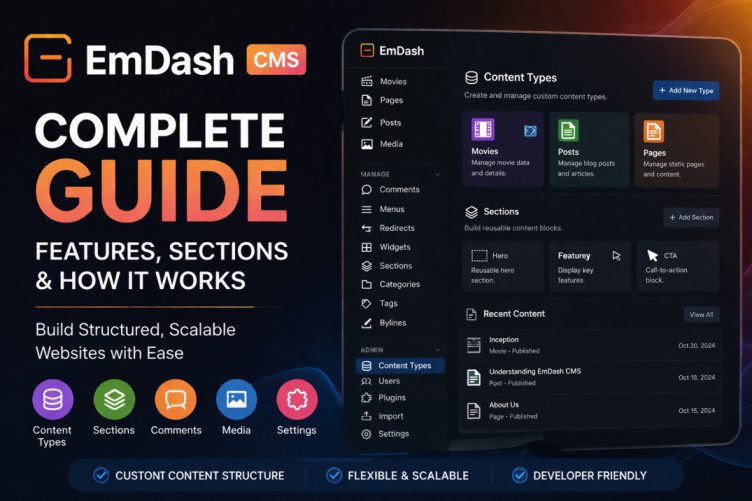
EmDash CMS: A Complete Guide to Its Features & Sections
If you’re searching for a modern, flexible, and structured content management system, EmDash CMS is a powerful option worth exploring. Designed with simplicity and scalability in mind, EmDash allows you to manage content efficiently while maintaining full control over structure and organization.
This detailed guide explains every section of EmDash CMS, helping beginners and advanced users understand how it works and how to use it effectively.
🧩 What is EmDash CMS?
EmDash CMS is a lightweight, modular content management system that enables you to create, manage, and organize content using customizable structures.
Key capabilities:
- Create custom content types
- Manage blogs, pages, and media
- Organize content with categories and tags
- Extend functionality using plugins
It is ideal for:
- Blogging websites
- Content platforms
- Portfolio or media sites
- Structured data projects
📂 Core Content Sections in EmDash CMS
These sections form the foundation of your website content.
🎬 Movies
The Movies section is a custom content type used for managing movie-related data.
Features:
- Add movie titles, descriptions, and release dates
- Store metadata like genres, ratings, and cast
- Build a complete movie database
Best use cases:
- Movie review websites
- Entertainment platforms
- Streaming catalogs
📄 Pages
The Pages section is used for static content that does not change frequently.
Examples:
- About Us
- Contact Page
- Terms & Conditions
Benefits:
- Simple structure
- Ideal for permanent content
- Helps build core website pages
📝 Posts
The Posts section is used for dynamic content like blogs and articles.
Features:
- Publish blog posts
- Add categories and tags
- Schedule content
Best use cases:
- Blogging
- News publishing
- SEO content marketing
🖼 Media
The Media Library stores all your uploaded files.
You can:
- Upload images, videos, and documents
- Reuse media across content
- Organize assets efficiently
⚙️ Management Section Explained
This section controls how your content behaves and is organized.
💬 Comments
Manage user engagement directly from the dashboard.
Options:
- Approve or delete comments
- Filter spam
- Moderate discussions
📑 Menus
The Menus section allows you to control website navigation.
You can:
- Create navigation menus
- Add pages, categories, or custom links
- Organize header and footer menus
🔁 Redirects
The Redirects feature is crucial for SEO.
Use it to:
- Fix broken URLs
- Redirect old pages
- Avoid 404 errors
🧱 Widgets
Widgets are reusable content elements.
Examples:
- Sidebar blocks
- Recent posts
- Promotional banners
They help in building flexible layouts without coding.
🧩 Sections
The Sections feature allows you to create reusable layout blocks.
Key benefits:
- Build modular page designs
- Reuse content across pages
- Maintain consistency
This is especially useful for dynamic page building.
🏷 Categories
Categories help organize content into broad groups.
Example:
- Blog → Technology, Business
- Movies → Action, Drama
SEO benefit:
Improves content structure and navigation.
🔖 Tags
Tags provide more specific classification than categories.
Example:
- “AI”, “Crypto”, “WordPress”
Benefit:
Enhances searchability and filtering.
✍️ Bylines
The Bylines section manages authors and contributors.
Features:
- Assign authors to posts
- Display contributor names
- Manage multi-author content
🔐 Admin Section in EmDash CMS
This section controls system-level settings and customization.
🗂 Content Types
The most powerful feature of EmDash CMS.
You can:
- Create custom content types
- Define fields (text, images, dates, etc.)
- Structure your data
Example:
- Movies
- Products
- Reviews
This gives complete flexibility over content.
👥 Users
Manage user roles and permissions.
Common roles:
- Admin
- Editor
- Author
This ensures secure content management.
🔌 Plugins
Extend the functionality of your CMS.
Examples:
- SEO tools
- Analytics integration
- Custom features
📥 Import
The Import feature allows bulk data upload.
Use cases:
- Migrate from another CMS
- Upload CSV or JSON data
- Save time during setup
⚙️ Settings
Global configuration for your website.
Includes:
- Site settings
- System preferences
- Performance options
🧠 Advantages of EmDash CMS
- Clean and modern interface
- Highly customizable content structure
- Built-in content type management
- Lightweight and fast
- Scalable for growing websites
⚠️ Limitations of EmDash CMS
🏁
EmDash CMS is a strong choice for users who want structured content management without the complexity of traditional platforms. Its
Content Types and Sections features make it especially powerful for building scalable and organized websites.
If you are transitioning from WordPress or page builders, EmDash offers a more structured and developer-friendly approach while still being flexible enough for modern web projects.


