What Complex Websites Can You Build with Themify PTB, Add-ons, Builder, and Builder Pro?
Have you ever wondered how far you can go with Themify PTB, its add-ons, Themify Builder, and Builder Pro?
Most people think of WordPress as a tool for building blogs, business websites, and online stores. But with the right combination of Themify tools and a few additional plugins, you can build much more than that.
You can create websites where visitors search for properties, explore travel packages, find local businesses, browse music collections, apply for jobs, or even book experiences online.
The best part? You don’t have to create every page manually.
With Post Type Builder (PTB), you can organise your content into custom sections with their own fields and categories. With Builder Pro, you can design templates that automatically display the right information for each item.
Add Themify Builder and the appropriate PTB add-ons, and you have a flexible foundation for building much more advanced WordPress websites.
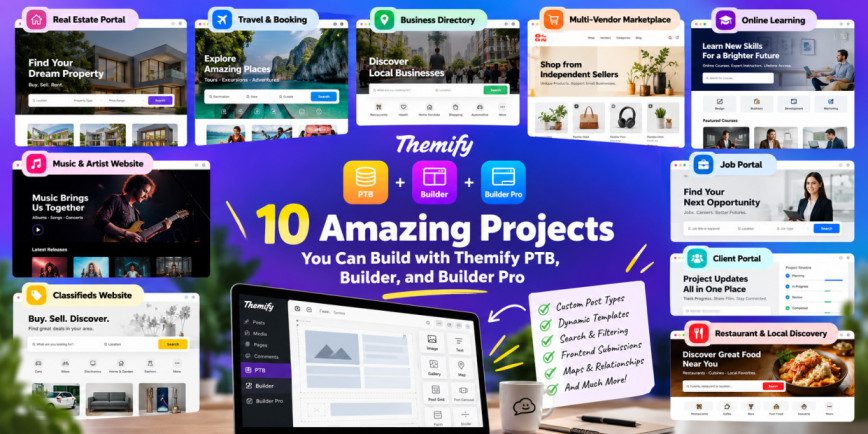
Let’s look at 10 interesting projects you can build with this combination, what features they can include, and where you might need additional plugins.
1. Build Your Own Real Estate Portal
Example: A website for buying, selling, or renting properties.
Imagine building a website where visitors can browse hundreds of properties, filter them by price and location, and view detailed information about each one.
Instead of creating every property page from scratch, you can use PTB to create a custom post type called Properties.
Each property can have its own information, including:
- Price and location
- Number of bedrooms and bathrooms
- Property size and type
- Amenities and facilities
- Image galleries
- Sale or rental status
Using Builder Pro, you can design one property page template and reuse it for every listing.
You can also create archive pages that display properties in a grid, along with search and filtering options supported by the relevant add-ons.
What else can you add?
You can connect properties with agent profiles, display related properties, and allow agents to submit listings through the frontend.
For features such as paid listings, saved properties, advanced agent dashboards, and enquiry management, you may need additional plugins.
Why this project is useful: It’s a great way to turn a regular WordPress website into a searchable property directory.
2. Create a Travel and Excursion Booking Website
Example: A website offering tours, adventure activities, and holiday packages
A travel website is another excellent project for Themify PTB and Builder Pro.
You can create separate sections for destinations, excursions, tour guides, and travel packages.
For example, every excursion could have its own:
- Name and destination
- Price and duration
- Itinerary
- Featured images and videos
- Included services
- Meeting point and difficulty level
Visitors could browse destinations, explore available tours, and view detailed excursion pages.
You could also connect each destination to its related excursions, making it easier for visitors to discover activities in a particular location.
Can you accept bookings and payments?
Yes, but you’ll need the right booking system.
PTB can manage the excursion information, while WooCommerce and a compatible booking plugin can handle checkout, date selection, availability, and reservations.
This is particularly useful if you want to build a website for a travel agency or a business offering guided tours and activities.
3. Build a Business Directory
Example: A directory of doctors, restaurants, consultants, or local service providers.
What if you wanted to build a website where people could find businesses based on their location, category, or services?
With PTB, you can create a custom post type for businesses and add fields for addresses, contact information, photographs, opening hours, and services.
You could then build:
- Business listing pages
- Individual business profiles
- Category-based directories
- Location-based search
- Related business listings
- Featured business sections
For example, a website listing home service providers could let visitors browse plumbers, electricians, painters, and cleaning services.
You can also allow business owners to submit their own listings using a suitable frontend submission setup.
Want to earn money from the directory? You could introduce paid listings or premium business profiles with additional plugins.
Why this project is useful: It works well for niche directories that focus on a particular city, industry, or type of service.
4. Create a Multi-Vendor Marketplace
Example: A marketplace where multiple sellers offer products or services.
A multi-vendor marketplace is a bigger project, but the Themify ecosystem can still play an important role.
You could build a marketplace for handmade products, local services, digital offerings, or specialised equipment.
PTB can organise vendor profiles and custom listing information, while Builder Pro can display vendor pages and other dynamic content.
WooCommerce can handle products, shopping carts, checkout, and orders.
With a suitable multi-vendor plugin, you can add features such as:
- Seller registration
- Individual vendor storefronts
- Product listings
- Featured sellers
- Seller dashboards
- Commissions and payouts
However, these advanced marketplace features do not come automatically with PTB or Builder Pro. You’ll need additional software and careful integration.
The important thing to remember: Themify can help you build the website’s structure and appearance, while dedicated marketplace tools manage the more complicated selling process.
5. Build an Online Learning Website
Example: A website offering courses, tutorials, or professional training.
You can use PTB to organise courses, instructors, learning categories, and educational resources.
Each course could include its title, description, duration, difficulty level, instructor, videos, and downloadable materials.
Builder Pro can then display the courses through reusable templates.
For example, you could create:
- A searchable course catalogue
- Individual course pages
- Instructor profiles
- Courses grouped by subject
- Related courses and learning resources
If you want to sell courses or provide access only to enrolled students, you can integrate an LMS or membership plugin.
A proper LMS is also necessary for features such as quizzes, student progress tracking, lesson completion, and certificates.
This combination works particularly well if you want a specialised learning website with a carefully organised course catalogue.
6. Create a Musician or Artist Website
Example: A website showcasing songs, albums, artists, and concerts.
A musician’s website doesn’t have to be limited to a biography and a few music videos.
With PTB, you can organise songs, albums, artists, concerts, and venues into separate content types.
Every song could have its own:
- Title and cover image
- Duration and genre
- Lyrics
- Music video
- Release date
- Streaming links
You could connect songs to their albums and artists, then use Builder Pro to display complete discographies and artist profiles automatically.
You could also create concert listings, show upcoming releases, or display a timeline of a song’s progress through recording, mixing, mastering, and release.
This is a good example of how PTB relationships can save time. Instead of manually adding the same artist information to every song, you can connect the song to the artist’s profile.
Additional plugins may be needed for ticket sales, paid music downloads, or more advanced audio features.
7. Build a Job Portal
Example: A website where companies publish vacancies and candidates find jobs.
You can create a job portal with custom post types for jobs, companies, recruiters, and other recruitment-related content.
Each job listing could include:
- Job title and description
- Company name
- Location
- Salary range
- Experience requirements
- Employment type
- Application deadline
Builder Pro can display individual job pages and searchable job archives.
You could also organise jobs by location, industry, or employment type.
With additional plugins, employers could submit vacancies, candidates could upload CVs, and recruiters could manage applications.
If you want to build a complete recruitment platform with employer dashboards and application tracking, you’ll need more than PTB and Builder Pro alone.
Still, they provide a useful foundation for organising and displaying job listings.
8. Create a Classifieds Website
Example: A website for buying and selling used cars, bikes, equipment, or other items.
Classifieds websites are ideal for structured content.
You could create a custom post type called Listings and add fields for price, condition, brand, model, location, and photographs.
Visitors could browse listings, filter results, and open individual pages to view all the details.
For example, a motorcycle marketplace might include filters for brand, engine capacity, price, and condition.
You could also create seller profiles, display related listings, and highlight featured advertisements.
Additional plugins can help with listing submissions, expiry dates, paid advertisements, saved listings, and messaging.
This is a practical project because you can start with a simple directory and gradually add more advanced features as the website grows.
9. Build a Client Portal or Project Tracking Website
Example: A website where clients can view project updates and milestones.
You can also use PTB to organise projects, clients, milestones, deliverables, and resources.
Each project could have a status, start date, target completion date, description, and associated milestones.
With Builder Pro, you could create project pages that display this information in a consistent layout.
For example, a client might see the current project status, completed milestones, upcoming tasks, and relevant documents.
You could also create forms for submitting requests or displaying project updates.
However, this type of project requires special attention to privacy. Clients must only be able to access information they are authorised to see.
You’ll need suitable access controls and possibly custom development for secure dashboards, task assignments, automated reminders, and collaboration features.
When should you consider this project? When you want to move beyond displaying public content and start building a more application-like experience.
10. Create a Restaurant and Local Discovery Website
Example: A website where visitors discover restaurants, cuisines, and local attractions.
With PTB, you can create structured listings for restaurants, cuisines, locations, menus, and special offers.
Each restaurant could have its own page with photographs, contact information, address, cuisine, opening hours, and menu details.
You could then build:
- Restaurant listing pages
- Cuisine-based categories
- Location-based search
- Individual restaurant profiles
- Related restaurant recommendations
- Featured listings
- Map-based discovery
For a city-focused website, visitors could browse restaurants by neighbourhood or cuisine.
You could also allow restaurant owners to submit their listings or pay for featured placements.
If you want live table reservations, real-time availability, or customer reviews, you’ll need appropriate integrations or additional plugins.
This is another excellent example of how custom post types and dynamic templates can work together to create a useful directory.
How Do These Tools Work Together?
You might be wondering how all these projects are possible with the same set of tools.
The answer is that each tool has a different job.
PTB organises your content. You decide what information each item needs.
PTB add-ons provide additional features such as search, relationships, and frontend submissions, depending on the add-ons you use.
Themify Builder helps you design the visual layout of your pages.
Builder Pro lets you create reusable templates that automatically display the right information for each item.
Other plugins handle features that need specialised functionality, such as bookings, payments, memberships, or advanced user permissions.
For example, imagine a travel website with 200 excursions.
You create the Excursions post type in PTB and add fields for price, duration, destination, and itinerary.
Next, you design an excursion template in Builder Pro.
Whenever you publish a new excursion, the template displays its information automatically. You don’t need to design a new page from scratch.
You can use the same approach for properties, job listings, businesses, courses, songs, and many other types of content.
Which PTB Add-ons Should You Consider?
You don’t need every add-on for every project. Choose the ones that solve a specific problem.
- Extra Fields: Useful when you need specialised fields for your custom content.
- Search: Useful for building search forms with supported filtering options.
- Relation: Useful for connecting related post types, such as songs and albums or properties and agents.
- Submissions: Useful when visitors need to submit custom content through the frontend.
- Map View: Useful for displaying supported location-based listings on a map.
Before starting a project, check the documentation for the add-ons you plan to use to confirm that they support your exact requirements.
You can find more information in the Themify PTB documentation.
Can You Build Everything Using Themify Alone?
Not quite, and it’s important to understand the difference.
Themify is excellent for organising content and designing dynamic websites. But some projects require functionality beyond content management.
For example:
- A property directory may need paid listings and agent dashboards.
- A travel website may need booking availability and payment processing.
- A marketplace may need vendor commissions and payouts.
- An online learning platform may need quizzes and student progress tracking.
- A client portal may need secure access controls and automated workflows.
These features generally require additional plugins, integrations, or custom code.
The good news is that you don’t have to build everything at once. Start with the features supported by your existing tools, then add the functionality your project actually needs.
A Simple Way to Get Started
If you want to explore the capabilities of PTB and Builder Pro, start with a small project that can grow over time.
A travel and excursions website is a good example.
Step 1: Create your content types.
Start with Destinations and Excursions.
Step 2: Add the necessary fields.
Create fields for price, duration, itinerary, and other excursion details.
Step 3: Design your templates.
Use Builder Pro to create excursion pages and destination archives.
Step 4: Connect related content.
Use the appropriate PTB functionality to display excursions associated with each destination.
Step 5: Add search and filtering.
Help visitors find excursions based on their requirements.
Step 6: Add bookings if needed.
Integrate a compatible booking system when you’re ready to accept reservations and payments.
Once the basic website works well, you can expand it with tour guide profiles, operator submissions, featured listings, and other advanced features.
Themify PTB, its add-ons, Builder, and Builder Pro can help you build much more than a conventional WordPress website.
You can create property portals, travel websites, business directories, marketplaces, learning platforms, music catalogues, job boards, classifieds websites, client portals, and restaurant directories.
The real advantage is that you can organise information once and display it in many different ways without manually designing every page.
Start with the content you need to manage, build reusable templates around it, and add specialised plugins when you need more advanced functionality.
With the right planning, this combination can provide a solid foundation for building powerful, database-driven WordPress websites.
For more examples, explore the Themify Builder Pro documentation and see how PTB and Builder Pro can be used together.