
























Custom Post Types & PTB: The Ultimate Guide to Post Type Builder in 2026
If you’re serious about building advanced WordPress websites in 2026, understanding Custom Post Types (CPTs) and mastering PTB (Post Type Builder) is no longer optional — it’s essential.
Modern WordPress sites are not just blogs. They are:
- 📂 Directories
- 🏠 Real-estate portals
- 🛍️ Listings & catalogs
- 🎨 Portfolios
- 📅 Event platforms
All of these rely on structured content, and that’s exactly what Custom Post Types + PTB are designed for.
In this guide, you’ll learn:
- What Custom Post Types are (in simple terms)
- Why PTB (Post Type Builder) is better than traditional CPT plugins
- How PTB addons (Search, Map View, Relation, Submissions) unlock real-world use cases
- Why PTB is future-proof for WordPress in 2026 and beyond
🧩 What Are Custom Post Types (CPTs) in WordPress?
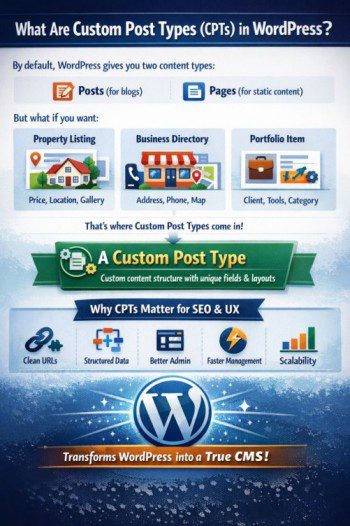
By default, WordPress gives you two content types:
- Posts (for blogs)
- Pages (for static content)
But what if you want:
- A Property with price, location, gallery?
- A Business Listing with address, phone, map?
- A Portfolio Item with client, tools, category?
That’s where Custom Post Types (CPTs) come in.
✅ In simple words:
A Custom Post Type is a custom content structure with its own fields, layout, and behavior, separate from regular posts.
🔑 Why CPTs Matter for SEO & UX
- Clean URLs (
/properties/house-in-delhi/) - Structured data for Google
- Better admin organization
- Faster content management
- Scalability as your site grows
WordPress becomes a real CMS, not just a blogging tool.
🛠️ What Is PTB (Post Type Builder) by Themify?
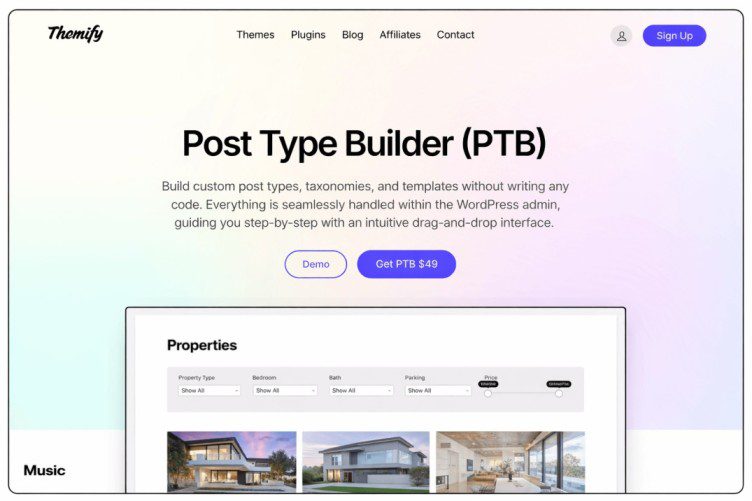
Themify Post Type Builder (PTB) is a powerful WordPress plugin that lets you create and manage custom content — visually.
Unlike basic CPT plugins, PTB doesn’t stop at registration. It gives you a complete system:
- Custom post types
- Custom fields
- Custom taxonomies
- Archive & single templates
- Dynamic frontend display
🔥 Why PTB Is Different
Most CPT plugins only:
❌ Register post types
❌ Add fields
❌ Leave templates to developers
PTB goes further:
✔ Registers CPTs
✔ Adds structured fields
✔ Builds templates visually
✔ Displays content dynamically
This is why PTB is ideal for non-developers and power users alike.
⚙️ How PTB Works (Beginner-Friendly Flow)
- Create a new Post Type (e.g., “Properties”)
- Add Custom Fields (price, location, gallery, etc.)
- Assign Taxonomies (city, property type)
- Design Single & Archive Templates
- Display content anywhere using PTB shortcodes or Builder modules
All done inside WordPress — no PHP, no stress.
🚀 PTB Addons Explained (With Real-World Use Cases)
PTB becomes truly powerful when combined with its addons.
📍 PTB Map View Addon
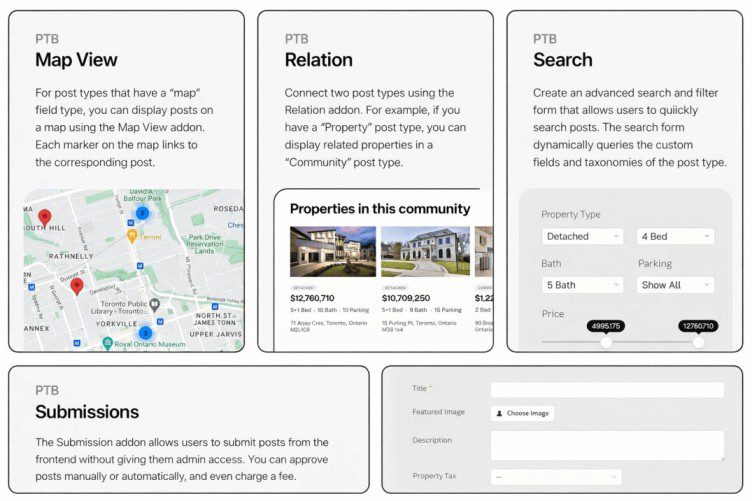
The PTB Map View addon displays your CPT entries on an interactive map using location fields.
What It Does:
- Reads latitude & longitude from PTB fields
- Shows listings as clickable markers
- Links each marker to its post
Best For:
- 🏠 Real estate listings
- 🏪 Store locators
- 🍽️ Restaurant directories
This addon improves visual discovery and user engagement — a huge SEO + UX win.
🔍 PTB Search Addon
The PTB Search addon allows users to search and filter CPTs based on custom fields and taxonomies.
What It Does:
- Creates advanced filter forms
- Searches by price, location, category, etc.
- Works seamlessly with PTB post types
Best For:
- 📂 Business directories
- 🏘️ Property portals
- 📦 Product catalogs
Users find what they want faster — Google loves that.
🔗 PTB Relation Addon
The PTB Relation addon connects different post types together.
Example Relationships:
- Property ↔ Agent
- Event ↔ Speaker
- Course ↔ Instructor
Why It Matters:
- Adds content context
- Improves internal linking
- Enhances user journey
- Boosts SEO depth
Perfect for complex, content-rich websites.
📝 PTB Submissions Addon
The PTB Submissions addon allows users to submit CPT content from the frontend.
What It Enables:
- Frontend listing submissions
- Admin approval workflows
- Paid or free submissions
- User-generated content
Best For:
- 🧑🤝🧑 Community directories
- 🏢 Business listing websites
- 📅 Event submission platforms
This turns your site into a self-growing content platform.
🧠 Why PTB Is Perfect for WordPress in 2026
WordPress is moving toward:
- Structured content
- Dynamic templates
- No-code workflows
- AI-assisted site building
PTB aligns perfectly with this future.
✅ PTB Advantages
✔ No coding required
✔ Built for scalability
✔ SEO-friendly structure
✔ Visual template control
✔ Advanced addons for real use cases
If you’re building directories, listings, portfolios, or resource sites, PTB is not just helpful — it’s foundational.


