
























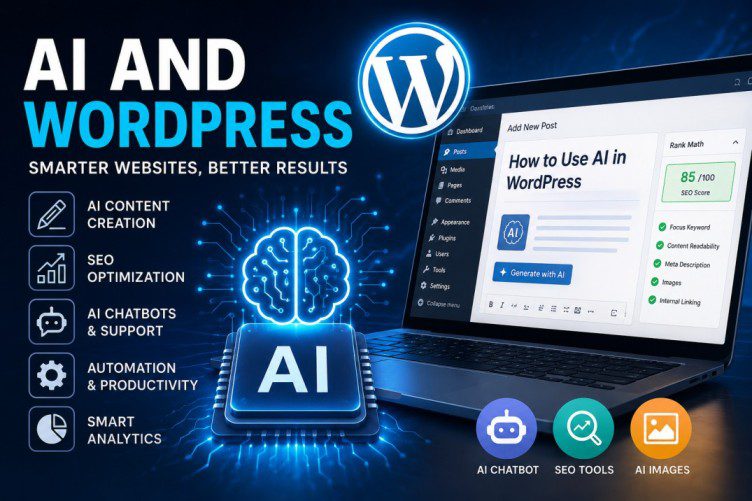
AI and WordPress: A Complete Step-by-Step Guide to Using Artificial Intelligence in WordPress (2026)
Artificial Intelligence (AI) is transforming the way websites are built, managed, and optimized. Whether you’re a blogger, affiliate marketer, business owner, or developer, AI can help you create content faster, improve SEO, automate customer support, generate images, and increase website conversions.
With WordPress powering over 40% of websites worldwide, combining AI with WordPress creates endless opportunities for growth and automation.
In this comprehensive guide, you’ll learn exactly how to use AI in WordPress, the best AI tools available, and a step-by-step process to implement AI on your website.
What is AI in WordPress?
AI in WordPress refers to the integration of artificial intelligence tools and technologies that automate tasks such as:
✅ Content creation
✅ SEO optimization
✅ Image generation
✅ Chatbots and customer support
✅ Website design
✅ Code generation
✅ Email marketing
✅ Analytics and reporting
Instead of spending hours creating content or optimizing pages manually, AI can perform many tasks within minutes.
Benefits of Using AI in WordPress
1. Faster Content Creation
AI writing tools can generate:
- Blog posts
- Product descriptions
- Landing pages
- Social media captions
- Email newsletters
2. Better SEO
AI helps identify:
- Keywords
- Search intent
- Meta descriptions
- Internal linking opportunities
3. Improved User Experience
AI-powered chatbots provide:
- Instant customer support
- Lead generation
- Product recommendations
4. Increased Productivity
Website owners can automate repetitive tasks and focus on business growth.
5. Cost Savings
AI reduces the need for multiple freelancers or expensive content creation services.
Popular AI Tools for WordPress
1. OpenAI ChatGPT
Best for:
- Writing blog posts
- Content outlines
- FAQs
- Email creation
- Code generation
2. Jasper
Best for:
- Marketing copy
- SEO articles
- Product descriptions
3. Surfer SEO
Best for:
- Content optimization
- Keyword research
- SERP analysis
4. Rank Math
Best for:
- AI-powered SEO recommendations
- Meta optimization
- Schema markup
5. Elementor AI
Best for:
- Website design
- AI-generated layouts
- Content generation
Step 1: Install WordPress
Before using AI, ensure you have a WordPress website.
Requirements:
- Domain Name
- Hosting Account
- WordPress Installation
Most hosting providers offer one-click WordPress installation.
Step 2: Install an AI SEO Plugin
SEO remains critical for website traffic.
Recommended Plugin
Install:
After installation:
- Go to Dashboard → Plugins → Add New
- Rank Math
- Click Install
- Activate Plugin
- Complete Setup Wizard
Benefits:
- AI Content Suggestions
- Keyword Optimization
- Schema Generation
- SEO Analysis
Step 3: Use ChatGPT for Content Creation
One of the easiest ways to integrate AI into WordPress is through ChatGPT.
Example Prompt
Write a 1500-word SEO blog post about WordPress security.

Include:
- Introduction
- Best practices
- Plugins
- FAQs
- Conclusion
Process
- Generate article with ChatGPT
- Edit and fact-check
- Add images
- Publish in WordPress
Pro Tip
Always add:
- Personal experience
- Original screenshots
- Expert insights
This helps content rank better in search engines.
Step 4: Generate Featured Images with AI
Visual content increases engagement.
Popular AI image tools:
- ChatGPT Image Generation
- Midjourney
- Adobe Firefly
- Canva AI
Example prompt:
Create a modern WordPress website dashboard with AI technology, futuristic blue theme, professional design.Upload generated images to:
Media → Add New
Then assign as:
Post → Featured Image
Step 5: Optimize Content Using AI
Before publishing:
Check:
- Keyword density
- Headings structure
- Readability
- Internal links
- Meta description
AI tools can automatically suggest improvements.
Example SEO Checklist:
✅ Keyword in title
✅ Keyword in URL
✅ Keyword in first paragraph
✅ Internal links
✅ Image alt text
✅ Meta description
Step 6: Add AI Chatbots
AI chatbots can answer visitor questions 24/7.
Benefits:
- Lead generation
- Customer support
- Product recommendations
- FAQ automation
Popular options include:
- ChatGPT-powered chatbots
- Tidio AI
- WPBot
Example use cases:
- Answer product questions
- Book appointments
- Collect email addresses
Step 7: Use AI for Email Marketing
AI can generate:
- Subject lines
- Email sequences
- Newsletters
- Promotions
Example Prompt:
Write a welcome email sequence for new WordPress subscribers.Benefits:
- Higher open rates
- Faster email creation
- Better engagement
Step 8: Generate WordPress Code with AI
Developers can use AI to generate:
- CSS
- HTML
- JavaScript
- PHP snippets
Example Prompt:
Create CSS for a gradient animated button in WordPress.AI can significantly reduce development time.
Step 9: Use AI for Keyword Research
Keyword research helps identify ranking opportunities.
AI can discover:
- Long-tail keywords
- Low-competition keywords
- Content gaps
- Trending topics
Example:
Main Keyword:
WordPress SEOAI Suggestions:
- WordPress SEO checklist
- WordPress SEO plugins
- WordPress SEO guide for beginners
- WordPress AI SEO tools
Step 10: Automate Website Management
AI can automate:
Content Updates
Refreshing outdated articles.
Analytics
Generating performance reports.
Security Monitoring
Detecting suspicious activities.
Customer Support
Answering common questions automatically.
Best AI Plugins for WordPress in 2026
Common Mistakes to Avoid
1. Publishing AI Content Without Editing
Always review content for accuracy.
2. Ignoring SEO
AI-generated content still requires optimization.
3. Using Generic Prompts
Detailed prompts produce better results.
4. Not Adding Human Experience
Google rewards unique and helpful content.
5. Over-Automation
AI should assist humans, not replace expertise.
Future of AI and WordPress
The future of WordPress is increasingly AI-driven.
Expected developments include:
- Fully AI-generated websites
- Automated SEO optimization
- AI design assistants
- Voice-based website management
- Personalized content generation
- Advanced AI customer support
Businesses that adopt AI early will likely gain a significant competitive advantage.
Conclusion
AI is revolutionizing WordPress by making content creation, SEO, website design, and customer support faster and more efficient. Whether you’re a beginner blogger or an experienced WordPress professional, AI tools can help you save time, increase productivity, and grow your website.
The best approach is to start small—use AI for content creation and SEO optimization first, then gradually expand into chatbots, automation, and AI-powered website design.
By combining WordPress with AI, you can build smarter websites, attract more visitors, and create better user experiences in 2026 and beyond.


June 19, 2026 @ 3:57 pm
Thanks for writing this — Claude Fable 5 at has been useful for similar workflows. Claude Fable 5