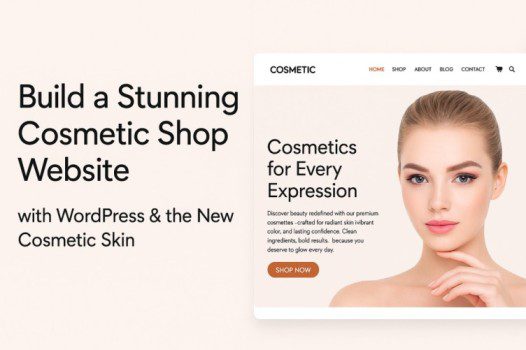
Build a Stunning Cosmetic Shop Website with WordPress & the New Cosmetic Skin
In today’s digital age, your cosmetic shop’s online presence is just as important as the quality of the products you sell. Whether you’re launching a skincare brand, selling makeup online, or running a boutique beauty store, having a professional, user-friendly website can make all the difference in attracting and retaining customers.
The best part? You don’t need to spend thousands of dollars on a web developer or spend months learning web design. With WordPress, WooCommerce, and the new Cosmetic Skin by Themify, you can launch a beautiful, high-converting online cosmetic store in just a few clicks.
Why WordPress is Perfect for Cosmetic Brands 🧴
If you’re serious about selling beauty products online, WordPress + WooCommerce is the ultimate solution. Here’s why it’s the go-to choice for beauty entrepreneurs:
- Full Creative Control: Customize your site exactly the way you want — no limitations like other platforms.
- Cost-Effective: Avoid high monthly fees from platforms like Shopify or Wix.
- SEO-Friendly: Rank your cosmetic products on Google and attract organic traffic.
- Scalable: Start small and easily grow into a global brand.
- Thousands of Plugins: Add powerful features like loyalty programs, email marketing, and upsells.
WooCommerce, the world’s most popular e-commerce plugin, gives you everything you need to manage your store:
- Add unlimited products
- Track inventory and stock easily
- Offer discounts, coupons, and special deals
- Support multiple payment gateways like PayPal and Stripe
- Automate shipping and tax calculations
When paired with the Cosmetic Skin, you get a ready-made design that’s not only beautiful but also built to convert visitors into loyal customers.
Introducing the Cosmetic Skin 🎨
The Cosmetic Skin is a professionally designed WooCommerce demo tailored for beauty brands. Whether you sell skincare, hair care, makeup, or fragrances, this skin provides a modern, polished website layout — without touching a single line of code.
Key Features You’ll Love:
- Elegant, modern design perfect for showcasing beauty products
- WooCommerce ready for seamless online selling
- Fully mobile-friendly and responsive
- Drag-and-drop builder — no coding required
- Optimized for speed and search engines
- Built-in product showcase pages
- Works seamlessly with Ultra, Shoppe, and Builder Pro
Three Ways to Launch Your Cosmetic Store 🌟
You can choose from three flexible options based on your business needs:
1. Ultra Cosmetic – Multi-Purpose Beauty Website
If you want a full-featured website that includes a blog, service pages, and an online shop, Ultra is the perfect choice. It comes with 60+ pre-made skins, including the Cosmetic Skin.
2. Shoppe Cosmetic – Focused on E-Commerce
For beauty brands focused entirely on selling products, Shoppe provides advanced features like quick product views, wishlists, and AJAX carts — everything you need to boost sales.
3. Pro Cosmetic (Builder Pro Plugin) – Upgrade Any WordPress Site
If you already have a WordPress site you love but want a modern cosmetic shop layout, Builder Pro lets you add the Cosmetic Skin without starting from scratch.
Step-by-Step Guide to Launch Your Store 🚀
Here’s how to get your cosmetic shop up and running quickly:
Step 1: Set Up WordPress
- Choose a reliable host like SiteGround or WP Engine.
- Install WordPress (most hosts offer one-click setup).
Step 2: Install WooCommerce
- Install the WooCommerce plugin to enable online selling.
- Configure payments, taxes, and shipping settings.
Step 3: Choose Your Theme
- Install Ultra, Shoppe, or Builder Pro.
- Import the Cosmetic Skin demo with a single click.
Step 4: Customize Your Website
- Upload your logo, brand colors, and fonts.
- Add product images and descriptions.
- Create product categories like Skincare, Makeup, and Fragrance.
- Enable coupons and email signup forms to grow your customer base.
Step 5: Launch & Promote
- Test your checkout process thoroughly before going live.
- Use SEO plugins like Rank Math or Yoast SEO to optimize your site.
- Promote your store on Instagram, TikTok, and Pinterest to reach beauty enthusiasts.
Pro Tips to Grow Your Cosmetic Business 💡
- Invest in Product Photography: High-quality visuals are key to selling beauty products online.
- Create Educational Content: Tutorials and blogs build trust and showcase your expertise.
- Leverage Social Proof: Display reviews and user-generated content to increase sales.
- Run Limited-Time Promotions: Flash sales and bundles can boost urgency and conversions.
- Use Email Marketing: Keep customers engaged with newsletters and exclusive deals.
Start Your Beauty Business Today 💄
Your dream cosmetic shop is just a few clicks away!
✨ Explore the demos:
Whether you’re just starting or looking to expand, the Cosmetic Skin gives you everything you need to launch quickly, look professional, and start selling today.