WordPress 7.0.3 Released: 12 Security Vulnerabilities Fixed — Why You Should Update Now
WordPress 7.0.3 Released: 12 Security Vulnerabilities Fixed — Why You Should Update Now
WordPress 7.0.3 has arrived, and this is an update that website owners should not ignore.
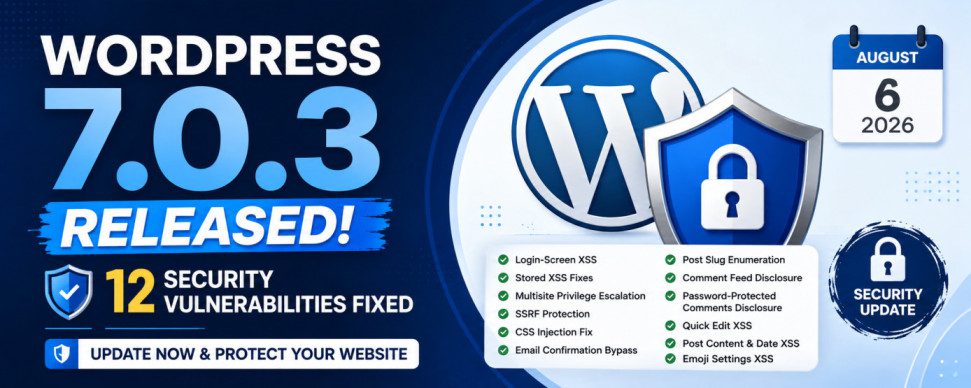
Unlike WordPress 7.0, which introduced major platform changes and new capabilities, WordPress 7.0.3 is primarily a security release. The update addresses 12 security vulnerabilities, including a serious pre-authentication reflected Cross-Site Scripting (XSS) vulnerability affecting the WordPress login screen.
For WordPress site owners, developers, agencies, WooCommerce stores, and administrators, the message is straightforward: update your WordPress installation as soon as possible.
The release was made available on August 6, 2026, shortly after WordPress 7.0.2 was released in July. Community reports indicate that WordPress 7.0.3 is being distributed through automatic updates on many installations.
But what exactly has changed in WordPress 7.0.3, and how serious are these vulnerabilities?
Let’s take a detailed look.
WordPress 7.0.3: At a Glance
| Item | Details |
|---|---|
| Release | WordPress 7.0.3 |
| Release type | Security release |
| Release date | August 6, 2026 |
| Security issues fixed | 12 |
| Major new features | No |
| Recommended action | Update immediately |
| Previous major release | WordPress 7.0 |
| Next major release | WordPress 7.1 |
WordPress 7.0, code-named “Armstrong,” was released on May 20, 2026. WordPress’ official version documentation lists WordPress 7.1 as the next major release, currently scheduled for August 19, 2026.
This means WordPress 7.0.3 should be viewed as a security hardening update rather than a new-feature update.
What’s New in WordPress 7.0.3?
The biggest change is simple:
WordPress has fixed 12 security vulnerabilities.
These issues cover several different areas of the WordPress platform, including:
- Cross-Site Scripting
- Login-screen security
- Multisite privilege escalation
- Server-Side Request Forgery
- CSS injection
- Information disclosure
- Email confirmation bypass
- Post slug enumeration
- Comment-feed information exposure
The vulnerabilities do not all have the same severity or affect every WordPress configuration.
However, because some of them affect unauthenticated users or administrative workflows, updating should be treated as a priority.
1. Login-Screen XSS Vulnerability
One of the most important fixes in WordPress 7.0.3 involves a pre-authentication reflected XSS vulnerability in the WordPress login screen.
The vulnerability has been tracked as CVE-2026-64638.
The particularly concerning aspect is that the issue can occur before normal WordPress authentication.
Under specific conditions, an attacker could potentially exploit the vulnerability by getting an administrator to interact with a malicious URL. Security researchers have reported that the vulnerability could potentially be chained with other WordPress functionality to reach PHP code execution.
This is why the issue has received considerable attention from the WordPress security community.
Why does this matter?
The WordPress login page is one of the most frequently targeted parts of a WordPress installation.
Attackers routinely target:
/wp-login.php/wp-admin/- XML-RPC
- REST API endpoints
- Application Password functionality
- User authentication mechanisms
A vulnerability in the login workflow can therefore have consequences beyond simply displaying malicious JavaScript.
For administrators, this reinforces an important security principle:
Never assume that a login page is safe simply because the attacker does not have an account.
2. Stored XSS Vulnerabilities
WordPress 7.0.3 also addresses multiple stored Cross-Site Scripting vulnerabilities.
Stored XSS is different from reflected XSS because malicious content can potentially be stored in the website database and subsequently displayed to other users.
Depending on the vulnerable component and permissions involved, this can potentially allow an attacker to execute JavaScript when another user visits an affected page or administrative screen.
The 7.0.3 fixes include issues involving areas such as:
- Post Content
- Post Date
- Quick Edit
- Emoji-related settings
Why is stored XSS dangerous?
Imagine a website with multiple users.
A lower-privileged user manages to inject malicious content into a location that is later viewed by an administrator.
The administrator opens the affected page.
The malicious script executes in the administrator’s browser.
Depending on the vulnerability and surrounding security controls, this can potentially allow an attacker to perform actions with the administrator’s privileges.
This is why XSS vulnerabilities should not be dismissed as “just JavaScript bugs.”
3. WordPress Multisite Privilege Escalation
Another important fix involves WordPress Multisite.
WordPress Multisite allows a single WordPress installation to operate multiple websites.
It is commonly used by:
- Universities
- Large organizations
- Publishing networks
- Agencies
- Enterprise websites
- Membership networks
- Educational institutions
WordPress 7.0.3 fixes a vulnerability that could allow a registered user to create a new site under certain Multisite configurations.
This is particularly relevant to administrators managing large WordPress networks.
Why Multisite requires additional caution
A security issue in a normal WordPress installation may affect one website.
A security issue in a Multisite network can potentially have a wider blast radius because multiple sites share the same WordPress installation and infrastructure.
Therefore, Multisite administrators should treat the 7.0.3 update as a high-priority maintenance task.
4. Server-Side Request Forgery Protection
WordPress 7.0.3 also strengthens protection against Server-Side Request Forgery (SSRF).
SSRF vulnerabilities can occur when an application allows attackers to influence requests made by the server.
Instead of the attacker’s browser making the request directly, the server is manipulated into making a request.
That can potentially be abused to access resources that should not be publicly reachable.
Examples can include:
- Internal services
- Local network resources
- Cloud metadata endpoints
- Administrative services
- Internal APIs
WordPress 7.0.3 addresses an issue related to URL validation and requests to link-local ranges.
For ordinary bloggers, this may seem like a highly technical fix.
For developers and hosting companies, however, SSRF protection is extremely important.
5. CSS Injection Fix
Another security issue addressed by WordPress 7.0.3 involves CSS.
Under certain circumstances, an Author-level user could potentially bypass a safe CSS attribute filter.
Why does CSS injection matter?
Because CSS is not always harmless.
Depending on where injected CSS is processed and what other browser features are available, attackers can potentially use CSS manipulation to:
- Modify page appearance
- Hide security warnings
- Manipulate interfaces
- Capture user interaction in some scenarios
- Support other attack techniques
The WordPress security team has therefore tightened the relevant filtering.
6. Password-Protected Content and Comment Disclosure
WordPress 7.0.3 also addresses an information-disclosure issue involving comments associated with password-protected posts.
Password protection is commonly used when website owners want to restrict access to specific content.
For example:
- Private announcements
- Client documents
- Internal information
- Draft content
- Members-only material
- Temporary pages
If information related to protected content leaks through a public feed or interface, the password protection mechanism becomes less effective.
The 7.0.3 changes help prevent comment information from being exposed through the Latest Comments functionality in these circumstances.
7. Email Confirmation Bypass
WordPress 7.0.3 also fixes an issue related to email-address confirmation.
Email confirmation is an important security mechanism because WordPress and plugins can use a confirmed email address for:
- Account recovery
- Notifications
- Identity verification
- Administrative communication
- Security alerts
A vulnerability that allows confirmation to be bypassed can undermine these workflows.
For site owners, this is another reason why keeping WordPress core updated is important even when everything appears to be working normally.
8. Post Slug Enumeration
The release also includes a fix intended to reduce post slug enumeration.
A post slug is the URL-friendly portion of a WordPress URL.
For example:
example.com/wordpress-security-guide/
The slug is:
wordpress-security-guide
Being able to enumerate unpublished or otherwise sensitive slugs can provide attackers with useful information about a website’s content structure.
The 7.0.3 changes reduce this information exposure.
This may not sound as dramatic as remote code execution, but information disclosure is often an important component of larger attack chains.
9. Comment Feed Information Disclosure
Another issue addressed in the release involves information that could potentially be exposed through comment feeds.
Feeds are often overlooked when securing a WordPress website because administrators typically focus on the visible front end.
However, WordPress generates information through multiple interfaces, including:
- RSS feeds
- Comment feeds
- REST API responses
- oEmbed
- XML-RPC
- Search endpoints
Every public interface represents another potential source of information leakage.
WordPress 7.0.3 closes one such avenue involving comment-feed notes.
Why WordPress 7.0.3 Is More Important Than a Typical Minor Update
Website owners sometimes ignore updates such as:
7.0 → 7.0.1 → 7.0.2 → 7.0.3
because they assume minor releases only contain small bug fixes.
That assumption can be dangerous.
WordPress uses minor releases to deliver security fixes precisely because security vulnerabilities need to be patched without waiting for the next major feature release.
WordPress’ documentation explicitly recommends immediately updating sites when a release is identified as a security release.
WordPress 7.0.3 vs WordPress 7.0
It is important to understand the difference between the two.
WordPress 7.0
WordPress 7.0 was a major release containing substantial changes to the platform.
The official documentation describes WordPress 7.0 as a major release and provides extensive developer documentation covering its new capabilities and changes.
WordPress 7.0.3
WordPress 7.0.3 is different.
It is primarily about:
Security + stability + hardening
Therefore, users should not install 7.0.3 expecting a redesigned dashboard or a collection of exciting new editor features.
The value of this release is that it makes the existing WordPress platform safer.
Does WordPress 7.0.3 Add Any Major New Features?
No.
If you’re looking for new WordPress features, 7.0.3 is not the release to focus on.
Instead, the update is about eliminating security weaknesses discovered in the existing platform.
This is actually good news for production websites.
A security update that does not introduce a large collection of new features generally means fewer reasons to postpone the update.
Who Should Update to WordPress 7.0.3?
Virtually every WordPress site running an affected version should update.
That includes:
Bloggers
Even a small personal blog can become a target because automated bots scan the internet for vulnerable WordPress installations.
Business websites
A compromised business website can result in:
- SEO spam
- Malware
- Defacement
- Stolen credentials
- Customer-data exposure
- Reputation damage
WooCommerce stores
WooCommerce websites deserve particular attention because they process customer information and potentially financial transactions.
A compromised store can have consequences far beyond the website itself.
Membership websites
Membership websites contain user accounts and personal information, making security vulnerabilities especially important.
WordPress Multisite networks
Multisite administrators should pay particular attention because one security problem can potentially have implications across multiple sites in the network.
Agencies
Agencies managing dozens or hundreds of WordPress websites should verify that all client installations have received the security update.
Should You Update Immediately?
Yes.
For production websites, the recommended approach is:
Step 1: Create a backup
Before updating WordPress core, create a current backup of:
- Database
wp-content- Themes
- Plugins
- Uploads
- Configuration
Your hosting provider may already maintain backups, but having an independent backup is even better.
Step 2: Check your WordPress version
Go to:
Dashboard → Updates
You can also check:
Dashboard → At a Glance
or the WordPress Site Health area.
Your website should show the current WordPress core version.
Step 3: Update WordPress
Navigate to:
Dashboard → Updates → Update to WordPress 7.0.3
If automatic background updates are enabled, your website may already have received the update.
Community reports from WordPress users indicate that many installations were automatically upgraded to 7.0.3 after its release.
Step 4: Check the website after updating
Don’t stop at the update button.
Visit:
- Homepage
- Important landing pages
- Contact forms
- Login page
- WooCommerce checkout
- Cart
- Account page
- Search
- Navigation menus
- Admin dashboard
For ecommerce websites, place a test order if your staging environment allows it.
What About Plugins and Themes?
Updating WordPress core does not automatically mean that every plugin and theme is secure.
You should separately check:
Dashboard → Plugins
and
Appearance → Themes
Look for updates from plugin and theme developers.
This is especially important because WordPress sites commonly contain dozens of third-party components.
A secure WordPress core can still be compromised through a vulnerable plugin.
What About WordPress 6.x Users?
If you’re still running an older WordPress branch, don’t assume that you have to jump directly to WordPress 7.0 without evaluating your environment.
WordPress security fixes can be backported to older supported branches, although WordPress notes that security updates for older branches are provided as a courtesy and the current major release is the officially supported version.
Site owners should therefore consider:
- Hosting compatibility
- PHP version
- Plugin compatibility
- Theme compatibility
- Custom code
- WooCommerce compatibility
- Staging environment testing
For heavily customized enterprise websites, test the update before deploying it to production.
What Developers Should Check After Updating
Developers should pay particular attention to code that interacts with:
- Authentication
- Login redirects
- REST API
- User roles
- Multisite
- Custom post types
- Quick Edit
- Post metadata
- Feeds
- URL validation
- CSS sanitization
- Comment functionality
Custom plugins that rely on undocumented WordPress behavior should also be tested.
Is WordPress 7.0.3 a Big Release?
From a feature perspective, no.
From a security perspective, yes.
This distinction is important.
A release doesn’t need to introduce a new editor or visual redesign to be important.
Security releases are often among the most important updates website owners can install.
WordPress 7.0.3 fixes 12 security issues across several areas of the platform, making it much more significant than the version number might suggest.
The Bigger WordPress Security Picture
The timing of WordPress 7.0.3 is also worth noting.
WordPress 7.0.2 was released on July 17, 2026, as another security update.
That means WordPress site owners have seen several security-focused updates in a relatively short period.
This is not necessarily evidence that WordPress is becoming less secure.
In fact, frequent security releases can indicate that vulnerabilities are being discovered, reported and patched rather than left unresolved.
For website owners, the lesson is simple:
WordPress security is a process, not a one-time task.
AI Is Changing the Security Landscape
One particularly interesting aspect of the current security environment is the increasing role of AI in vulnerability discovery and exploit research.
Recent security discussions around WordPress 7.0.3 have highlighted how modern AI-assisted security research can identify vulnerabilities and potentially chain multiple weaknesses together.
That creates an important challenge for CMS platforms.
Attackers can increasingly use automation to:
- Discover vulnerable websites.
- Identify software versions.
- Search for known vulnerabilities.
- Generate exploit attempts.
- Automate attacks at scale.
This makes delayed patching increasingly risky.
A vulnerability that is difficult for a human attacker to discover manually may become significantly easier to find when automated tooling is involved.
What WordPress Website Owners Should Do Now
Here’s a practical checklist.
WordPress 7.0.3 Security Checklist
- Check your WordPress version
- Update to WordPress 7.0.3
- Confirm the update completed successfully
- Take a fresh backup
- Update plugins
- Update themes
- Remove unused plugins
- Remove unused themes
- Check administrator accounts
- Review suspicious users
- Enable strong passwords
- Use two-factor authentication where available
- Review login security
- Check WordPress Site Health
- Test important website functionality
- Check WooCommerce checkout if applicable
- Review security logs
- Verify backups are working
What About Automatic Updates?
Automatic updates can be extremely useful for security releases.
If you operate many WordPress websites, manually checking every site every time a security release arrives can become difficult.
WordPress has built-in automatic update mechanisms, and community reports indicate that 7.0.3 was automatically deployed on many sites.
However, businesses with complex custom installations may prefer a controlled process:
Backup → Staging → Test → Production
The right approach depends on the website.
A small blog may be perfectly comfortable with automatic security updates.
A large WooCommerce store processing thousands of orders may want more controlled deployment.
What Should WooCommerce Store Owners Do?
WooCommerce users should take the update seriously.
Your WordPress installation is the foundation of the store, while WooCommerce and its extensions add additional functionality.
After updating WordPress, test:
- Product pages
- Add to cart
- Cart page
- Checkout
- Payment gateway
- Coupons
- Customer login
- My Account
- Order processing
- Emails
- Shipping calculations
- Tax calculations
- Webhooks
- Subscription functionality
If your store is mission-critical, perform these tests on staging before updating production.
Should You Install WordPress 7.0.3?
Yes — update.
WordPress 7.0.3 isn’t exciting in the traditional sense.
There isn’t a new page builder or dramatic dashboard redesign to talk about.
Instead, it does something far more important:
It closes security holes in the software powering millions of websites.
The release fixes 12 security vulnerabilities, including a notable pre-authentication XSS vulnerability affecting the login screen and other issues involving stored XSS, Multisite, SSRF, CSS injection and information disclosure.
For website owners, delaying the update provides very little benefit.
The safest approach is:
Back up your website → update WordPress → update plugins/themes → test the site → monitor for problems.
And if your website is still running an older WordPress version, this is a good opportunity to review your overall update and security strategy rather than simply installing one patch and forgetting about it.
WordPress 7.0.3 may look like a small point release, but security updates should never be judged by the size of the version number.
The release addresses 12 security vulnerabilities and comes at a time when automated vulnerability discovery and exploitation are becoming increasingly sophisticated.
For WordPress site owners, the best strategy remains simple:
Keep WordPress core updated. Keep plugins and themes updated. Maintain reliable backups. Use strong authentication. Remove software you don’t need.
If your WordPress dashboard is still showing an update for 7.0.3, don’t ignore it.
Update your site.