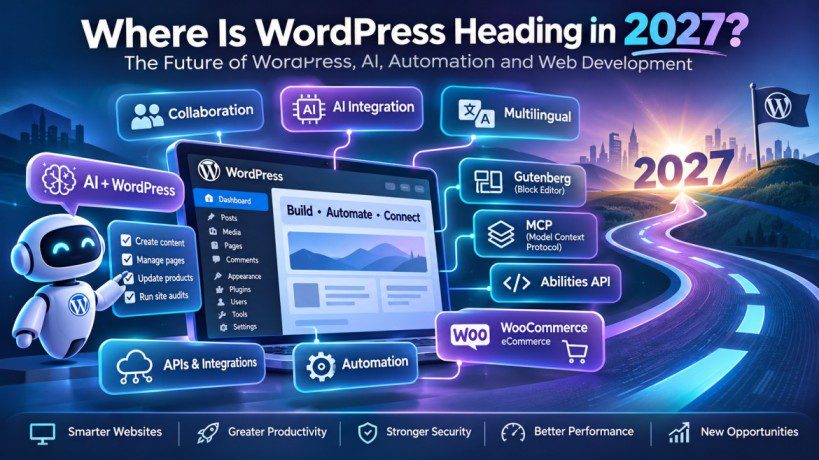
Where Is WordPress Heading in 2027? The Future of WordPress, AI, Automation and Web Development
Where Is WordPress Heading in 2027? The Future of WordPress, AI, Automation and Web Development
WordPress in 2027: How artificial intelligence, automation, Gutenberg, APIs and emerging technologies are reshaping the world’s most popular website platform.
WordPress has come a long way from its beginnings as a simple blogging platform. Today, it powers everything from personal blogs and business websites to online stores, membership platforms, news portals and complex digital experiences.
But the internet is changing rapidly.
Artificial intelligence is transforming how people create content, developers are adopting new technologies, businesses expect smarter digital experiences, and website owners want to accomplish more with less effort.
This raises an important question: Where is WordPress heading in 2027?
Will AI replace traditional WordPress development? Will page builders become less important? Will Gutenberg take over website design? Will developers need to learn React, APIs and AI integration to remain competitive?
The short answer is that WordPress is evolving beyond traditional website creation. It is moving towards a more intelligent, connected and automated ecosystem.
Let’s explore the changes shaping its future and what they mean for everyone.
1. The Evolution of WordPress: From Blogging Platform to Digital Ecosystem
WordPress started as a blogging platform, but its development over the years has transformed it into a flexible content management system (CMS).
Today, WordPress offers an extensive ecosystem of themes, plugins, page builders, eCommerce solutions, APIs and developer tools.
Businesses use it to build:
- Corporate and business websites.
- Personal blogs and online publications.
- eCommerce stores using WooCommerce.
- Membership and subscription platforms.
- Online learning portals.
- Portfolio and agency websites.
- Booking and appointment systems.
- Custom web applications.
However, the expectations of website owners are changing.
Previously, building a website involved selecting a theme, installing plugins, creating pages and configuring settings. In 2027, users increasingly expect their websites to be intelligent, automated and connected to other applications.
For example, imagine managing an online store where an AI assistant can help generate product descriptions, analyse customer questions, identify missing information and assist with routine store management.
This is the direction in which the WordPress ecosystem is developing.
WordPress will continue to serve as a content management and publishing platform, but its role in connected digital experiences is likely to become increasingly important.
2. Artificial Intelligence Will Become a Major Part of WordPress
Artificial intelligence is arguably one of the biggest developments influencing the future of WordPress.
AI is already being used for writing, image generation, SEO, customer support, coding assistance and website management.
In 2027, we can expect deeper integration between AI technologies and WordPress websites.
How AI could change WordPress
Consider some practical examples:
AI-powered content creation
Website owners could use AI to generate article outlines, draft content, suggest titles, create product descriptions and assist with content updates.
AI-assisted website management
Instead of navigating several dashboard screens, users could ask an AI assistant to perform supported tasks through natural language.
For example:
- Create a new blog post.
- Update a page title.
- Find posts without featured images.
- Generate product descriptions.
- Identify outdated content.
- Review website settings.
AI-powered customer support
AI chat assistants could answer common questions, help customers find products and assist with support requests.
AI-assisted development
Developers could use AI tools to generate code, explain PHP errors, identify potential conflicts and speed up repetitive development tasks.
However, AI-generated code and content still require human review. Security, accuracy, accessibility and compatibility cannot simply be delegated without oversight.
What does this mean for WordPress users?
You don’t necessarily need to become an AI engineer to benefit from AI.
Bloggers can use it to improve their publishing workflow. Businesses can automate repetitive tasks. Developers can use it to increase productivity. Agencies can explore new services.
AI is likely to become a useful part of the WordPress toolkit rather than a complete replacement for the platform.
3. MCP Could Change How AI Interacts with WordPress
One of the emerging technologies worth watching is the Model Context Protocol, commonly known as MCP.
MCP is a standard that allows compatible AI applications to connect with external tools and services.
In simple terms, it can provide a structured way for an AI assistant to discover and use capabilities exposed by another application.
For WordPress, this creates interesting possibilities.
What could WordPress and MCP do together?
Imagine connecting a WordPress website to an AI assistant.
Instead of manually navigating the dashboard, you could ask:
- Show me all published blog posts.
- Find pages that have missing SEO descriptions.
- Create a draft post about website security.
- List all WooCommerce products without descriptions.
- Check which plugins need attention.
- Update a page with approved content.
The AI assistant could use tools exposed by a WordPress integration to perform these operations, subject to the permissions and safeguards implemented.
Why is MCP important?
Traditional integrations often require custom connections between applications.
MCP offers a more standardized approach to exposing tools and resources to compatible AI clients.
The WordPress ecosystem is exploring this direction through projects such as the WordPress MCP Adapter and related AI initiatives.
It is important to understand that MCP does not automatically give an AI assistant unrestricted access to a website. The integration must expose specific capabilities, authenticate requests and enforce permissions.
Will every WordPress website need MCP?
Probably not.
A simple personal blog may never need an MCP integration. However, agencies, developers, eCommerce businesses and organizations managing multiple websites may find it useful.
MCP could become an important integration option as AI agents become more capable.
4. Gutenberg and Full Site Editing Will Continue to Shape WordPress
Gutenberg has changed how WordPress users create and manage content.
Instead of relying entirely on the traditional editor, users can create pages using individual blocks.
The Block Editor has gradually expanded into a broader site-editing experience through Full Site Editing.
This allows users to work with different parts of a website, including:
- Headers.
- Footers.
- Templates.
- Navigation.
- Content layouts.
- Reusable patterns.
- Global styles.
Why Gutenberg matters in 2027
The block editor is an important part of WordPress’s long-term direction.
As its capabilities expand, understanding Gutenberg will become increasingly valuable for designers and developers.
Some areas worth learning include:
Custom block development: Creating reusable blocks for specific business requirements.
Block themes: Building websites using modern block-based theme architecture.
Theme.json: Managing global styles, typography, colours and design settings.
Block patterns: Creating reusable page sections and layouts.
React and JavaScript: Understanding the technologies used in modern block development.
This does not mean that every existing page builder will disappear.
Popular solutions such as Themify, Elementor, Divi and Beaver Builder serve different audiences and offer established workflows.
However, developers who understand both traditional page builders and Gutenberg will have greater flexibility when working on different projects.
5. WordPress Will Become More Connected Through APIs
Websites no longer operate independently.
Modern businesses often use multiple applications for marketing, payments, customer management, analytics, communication and eCommerce.
WordPress needs to communicate with these systems.
This is where APIs become important.
The WordPress REST API already allows external applications to interact with WordPress content and functionality.
In 2027, API knowledge will remain valuable for developers building connected digital experiences.
Practical examples of API-driven WordPress websites
- Connecting WordPress to mobile applications.
- Synchronizing products with external inventory systems.
- Integrating customer data with CRM platforms.
- Sending form submissions to business applications.
- Connecting websites to AI services.
- Building custom reporting dashboards.
- Creating headless WordPress applications.
What is headless WordPress?
In a traditional WordPress installation, WordPress manages both the backend and frontend.
With a headless architecture, WordPress manages content while a separate frontend application displays it.
For example, a developer might use WordPress as the content management system and React or Next.js to build the frontend.
Headless WordPress can be useful when businesses need highly customized digital experiences, but it also introduces additional complexity.
It requires frontend development skills, deployment knowledge and ongoing maintenance.
For many websites, traditional WordPress remains the simpler and more practical choice.
6. WordPress Development Will Require a Broader Skill Set
The role of a WordPress developer is evolving.
In the past, many developers primarily focused on installing themes, customizing layouts, writing CSS and configuring plugins.
These skills remain useful, but modern projects increasingly require knowledge of multiple technologies.
Some of the most valuable skills to develop include:
PHP
PHP remains central to WordPress development.
Understanding PHP helps developers create custom plugins, themes, integrations, hooks, filters and backend functionality.
JavaScript and React
Modern WordPress development increasingly involves JavaScript.
React is especially relevant when developing custom Gutenberg blocks and interactive interfaces.
HTML and CSS
These remain essential for website structure, styling, accessibility and responsive layouts.
WordPress REST API
Developers should understand how to retrieve, create, update and manage WordPress data through API requests.
Database knowledge
Understanding MySQL and WordPress database structures helps developers troubleshoot performance problems and build custom functionality.
AI integration
Learning how to connect WordPress with AI services, manage API requests and build useful AI-powered features will open additional opportunities.
Security
Developers must understand authentication, permissions, sanitization, validation, escaping and secure coding practices.
The future WordPress developer will benefit from combining traditional CMS knowledge with modern development and integration skills.
7. WooCommerce Will Become More Intelligent
WooCommerce has established itself as a major eCommerce solution within the WordPress ecosystem.
Online stores increasingly need more than product listings and checkout pages.
They need automation, better customer experiences, useful analytics and integrations with external services.
AI could help WooCommerce store owners with:
- Generating product descriptions.
- Organizing product information.
- Creating SEO-friendly metadata.
- Analysing customer reviews.
- Assisting with customer support.
- Identifying incomplete product listings.
- Producing sales reports.
- Supporting inventory workflows.
For example, an online store with hundreds of products could use an AI-powered workflow to identify products with missing descriptions and prepare suggested updates for review.
However, AI should not independently make important pricing, refund, inventory or customer-data decisions without appropriate controls.
WooCommerce will likely benefit from the broader movement towards intelligent eCommerce and automated business processes.
8. Website Performance and Core Web Vitals Will Remain Important
A beautiful website is not necessarily a successful website.
Visitors expect websites to load quickly, work smoothly and provide a good experience across devices.
Performance will continue to matter in 2027.
Website owners should pay attention to:
- Image optimization.
- Efficient caching.
- Server response times.
- JavaScript and CSS optimization.
- Responsive layouts.
- Core Web Vitals.
- Database performance.
- Plugin quality.
- Accessibility.
AI may help identify performance problems and suggest improvements, but optimization will still require technical understanding.
Developers must also be careful not to install too many plugins or add unnecessary scripts in the pursuit of additional functionality.
A well-maintained WordPress website is often more valuable than one overloaded with features.
9. WordPress Security Will Become Even More Important
As websites become more connected to external applications and AI services, security deserves greater attention.
Every new integration can introduce additional security considerations.
Website owners and developers should focus on:
Authentication: Use secure authentication methods for API access.
User permissions: Give each user or integration only the access it needs.
Plugin management: Keep themes, plugins and WordPress core updated.
Backups: Maintain reliable backups and regularly test restoration procedures.
Input validation: Validate and sanitize user-submitted data.
Output escaping: Escape data appropriately when displaying it.
Monitoring: Review security logs and investigate suspicious activity.
AI safeguards: Require confirmation for sensitive operations and avoid exposing passwords, API keys or private information to AI systems.
AI can assist with security monitoring, but it should not replace proper security practices.
10. Will Traditional WordPress Page Builders Disappear?
This is a common question among WordPress users.
There are many established page builders, including:
- Elementor.
- Divi.
- Themify Builder.
- Beaver Builder.
- WPBakery.
- Bricks.
These tools have made website creation accessible to people without extensive programming experience.
Will Gutenberg eventually replace them?
Not necessarily.
Gutenberg is deeply integrated into WordPress, and its capabilities are expanding. However, page builders offer different interfaces, design systems, modules and workflows.
Many agencies and developers have invested years in their existing builder ecosystems.
The more realistic future is a competitive environment where block-based editing, visual page builders, custom development and AI-assisted design coexist.
Page builders may also introduce more AI-powered functionality.
For example, users may be able to generate layouts, suggest design improvements or create content sections using natural language.
The winners will be the tools that offer flexibility, performance, reliability and a good user experience.
11. WordPress Support and Maintenance Will Evolve
WordPress support is another area that could experience significant changes.
Support teams regularly deal with repetitive problems:
- Plugin conflicts.
- Theme compatibility issues.
- PHP errors.
- Broken layouts.
- Missing styles.
- Website performance problems.
- WooCommerce configuration issues.
- Hosting-related errors.
AI can help support engineers analyse error messages, explain possible causes and recommend troubleshooting steps.
Imagine a support engineer receiving a report that a website’s frontend builder stopped working after a plugin update.
An AI assistant could help:
- Review the reported symptoms.
- Analyse relevant error logs.
- Identify potentially conflicting plugins.
- Suggest a troubleshooting sequence.
- Prepare a response for the customer.
The support engineer would still need to reproduce the problem, verify the diagnosis and confirm the solution.
This means WordPress support professionals should not ignore AI.
Those who learn to use AI effectively may be able to resolve issues faster and handle more complex cases.
12. WordPress and No-Code Development Will Continue to Coexist
No-code and low-code platforms have made it easier for non-technical users to build websites and applications.
WordPress has always supported this approach through themes, plugins and visual builders.
AI is likely to make no-code development even more accessible.
Users may increasingly describe what they want instead of manually configuring every element.
For example:
“I need a website for my photography business with a portfolio, contact form, pricing page and booking system.”
AI tools may help generate an initial structure, content and design.
However, creating a professional website involves more than generating a layout.
Businesses still need:
- Good content.
- Brand identity.
- Accessibility.
- SEO.
- Security.
- Performance.
- Custom functionality.
- Maintenance.
No-code tools will make website creation easier, but technical knowledge will remain valuable for building reliable and scalable solutions.
13. What Will Happen to WordPress Jobs in 2027?
AI will influence the WordPress job market, but it is unlikely that all WordPress jobs will disappear.
Instead, the nature of the work may change.
Some repetitive tasks could become automated, while demand may grow for people who can build integrations, solve complex problems and manage modern WordPress systems.
Potentially valuable roles include:
- WordPress Developer.
- Gutenberg Developer.
- WordPress Plugin Developer.
- WooCommerce Developer.
- WordPress Support Engineer.
- WordPress Performance Specialist.
- WordPress Security Specialist.
- AI Integration Developer.
- MCP Developer.
- WordPress Automation Engineer.
Skills that may become less differentiated
Basic page assembly, repetitive content formatting and simple CSS changes may become easier to automate.
These skills will still be useful, but they may not be enough to distinguish a developer in a competitive job market.
Skills that can create new opportunities
Developers who understand PHP, JavaScript, APIs, databases, AI integration, security and troubleshooting will be better positioned to handle complex projects.
The important point is not to abandon WordPress.
It is to expand your capabilities beyond traditional website building.
14. How Should Beginners Prepare for WordPress in 2027?
If you are starting from scratch, you do not need to learn everything at once.
Start with the fundamentals and gradually expand your knowledge.
Here is a practical learning roadmap.
Step 1: Understand WordPress fundamentals
Learn how WordPress works, how to install it, configure settings, manage users and create pages and posts.
Understand the difference between themes and plugins.
Step 2: Learn HTML and CSS
These are essential for understanding how websites are structured and styled.
Practice by customizing an existing WordPress website.
Step 3: Learn PHP
Understand variables, functions, arrays, conditions, loops and object-oriented programming.
Then explore WordPress hooks, filters and the plugin development process.
Step 4: Explore Gutenberg
Learn how blocks work and experiment with the Site Editor.
Try creating a simple custom block.
Step 5: Learn JavaScript and React
You do not need to become an expert immediately.
Focus on the fundamentals and understand how they are used in modern WordPress development.
Step 6: Explore APIs
Learn how to use the WordPress REST API.
Build a small application that retrieves WordPress posts and displays them outside the WordPress dashboard.
Step 7: Experiment with AI integration
Connect a WordPress website to an AI service.
Build a simple feature, such as an AI-powered content assistant or customer support tool.
Step 8: Explore MCP
Learn how MCP clients and servers communicate.
Experiment with a WordPress MCP integration in a local development environment.
Always test integrations using a staging website and appropriate permissions.
Step 9: Build a portfolio
Do not focus only on completing tutorials.
Build real projects that demonstrate your ability to solve problems.
A working plugin, useful integration or automation project can communicate your skills more effectively than a long list of courses.
15. What Should WordPress Agencies and Business Owners Do?
The changes coming to WordPress are not only relevant to developers.
Businesses and agencies should also prepare.
For website owners
- Keep your WordPress installation updated.
- Review unnecessary plugins.
- Improve website performance.
- Maintain regular backups.
- Explore practical AI tools.
- Improve website accessibility.
- Review security and user permissions.
For freelancers
- Expand beyond basic website creation.
- Learn custom development.
- Offer maintenance and optimization services.
- Explore AI-powered solutions.
- Build reusable workflows.
For agencies
- Introduce AI-assisted development workflows.
- Train support teams to use AI responsibly.
- Explore automation opportunities.
- Improve testing and quality assurance.
- Offer AI integration services.
- Invest in API and custom plugin development.
The objective should not be to use AI everywhere.
It should be to identify where AI can genuinely improve productivity, customer experience and business results.
16. The Biggest WordPress Trends to Watch in 2027
Here is a summary of the major developments worth following.
| Technology or trend | Potential impact |
|---|---|
| AI integration | Smarter content and website workflows |
| MCP | Standardized AI-to-tool connectivity |
| Gutenberg | More block-based development |
| Full Site Editing | Greater control over complete websites |
| REST API | More connected applications |
| Headless WordPress | Custom frontend experiences |
| WooCommerce automation | More intelligent store management |
| AI-assisted support | Faster troubleshooting |
| Security automation | Better monitoring and risk detection |
| Performance optimization | Faster and more efficient websites |
These trends will not all develop at the same speed. Some are already established, while others are emerging technologies or reasonable expectations for the coming years.
17. Is WordPress Still Worth Learning in 2027?
Absolutely.
WordPress remains an important platform because of its flexibility, open-source ecosystem, large developer community and extensive plugin and theme marketplace.
But learning WordPress in 2027 should mean more than learning how to install a theme and create pages.
It should involve understanding how the platform works, how to customize it, how to connect it with other applications and how to solve real-world problems.
For beginners, WordPress can still be an excellent entry point into web development.
For experienced developers, it offers opportunities to explore AI, automation, integrations and modern application architecture.
For business owners, it provides a flexible foundation for building and expanding digital operations.
The future is not simply about building more websites.
It is about building more capable digital experiences.
Conclusion: WordPress in 2027 Will Be About Building Smarter Websites
WordPress is entering an interesting phase of its evolution.
Artificial intelligence, automation, MCP, Gutenberg, APIs and modern development technologies are creating new possibilities for the ecosystem.
Traditional WordPress skills will remain relevant, but developers and businesses will increasingly benefit from combining them with modern technologies.
AI will help people create content, automate repetitive work and interact with websites in new ways. APIs will connect WordPress to more applications. Gutenberg will continue to influence content creation and site editing. Security, performance and accessibility will remain fundamental.
The biggest opportunity will belong to people who are willing to adapt.
You do not need to learn every new technology or abandon the tools you already use.
Start with the fundamentals, understand the emerging technologies and build practical solutions.
WordPress is not just about building websites anymore. Its next chapter is about connecting, automating and making websites smarter.
The question is no longer whether WordPress will change.
The real question is: Are we ready to grow with it?